For Suno AI

Suno Prompt Generator

Prompt Maschine 1.5 · AI Mastering · Available October 30

Give your next song a clear direction. Create and edit a music style prompt, pair it with lyrics, and take both into Suno. Version 1.5 adds AI mastering for the finished track, on iPhone, iPad, Mac and Android.

A great Suno song starts with a great style prompt. Most people type two words and hope. Prompt Maschine builds the prompt like a producer would: it defines the genre and sub-genre, sets a BPM range, chooses vocals, describes the instrumentation and groove, adds an era influence and production notes — then hands you one clean, copy-ready prompt tuned for Suno's style field.

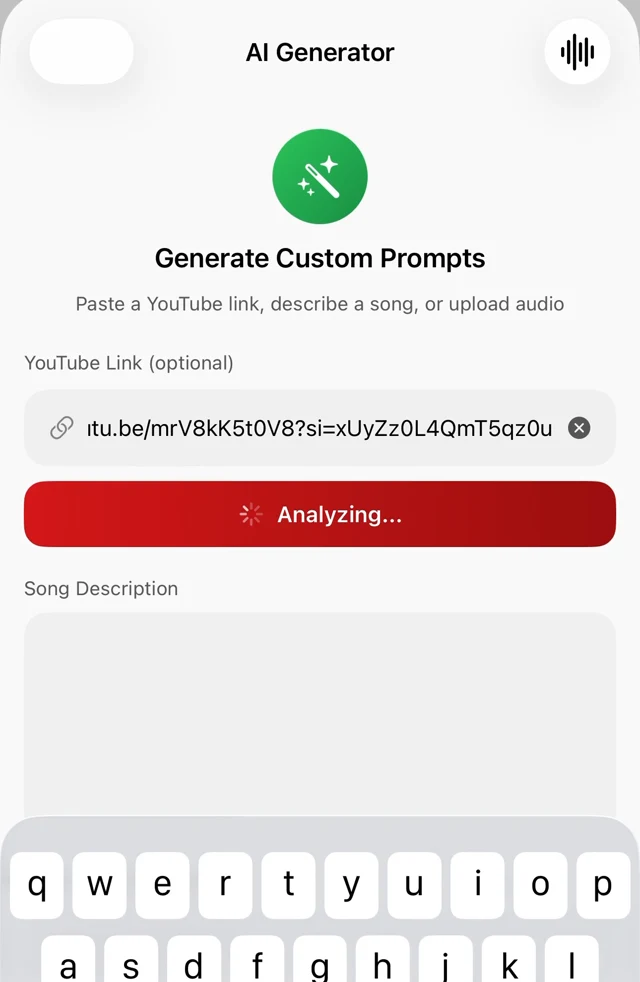
You can start from a plain description, from a style reference like "80s synth pop", or from a supported YouTube link. Prompt Maschine analyzes the reference and turns its musical characteristics into an editable prompt. Review the analysis and make it your own.

How it works

1
Describe or paste

Open Generate a Song and enter your Song Description, paste a supported YouTube link, or choose Upload Audio.

2
Set the vibe

Set your Style / Artist Reference, Language, Mood, Vocals and Instruments. On Apple devices, you can also choose a Vocal Persona.

3
Generate

Tap Generate AI Prompt, then review the resulting musical direction. Refine the style before pairing it with lyrics.

4
Paste into Suno

Copy the Style, Lyrics and Excludes into their separate fields in Suno. Set Variety to 0, then generate the audio in Suno.

What you get

  • One-tap copy of the final Suno-ready prompt
  • YouTube link analysis with a 30–60 word Suno style hint
  • Mood, vocal, language and instrument controls
  • Custom instrument selection
  • Era influence and production notes included
  • Prompt enrichment adds genre-matched Suno style tags
Suno prompt generator screen with YouTube link analysis
Generate a Song · YouTube reference controls
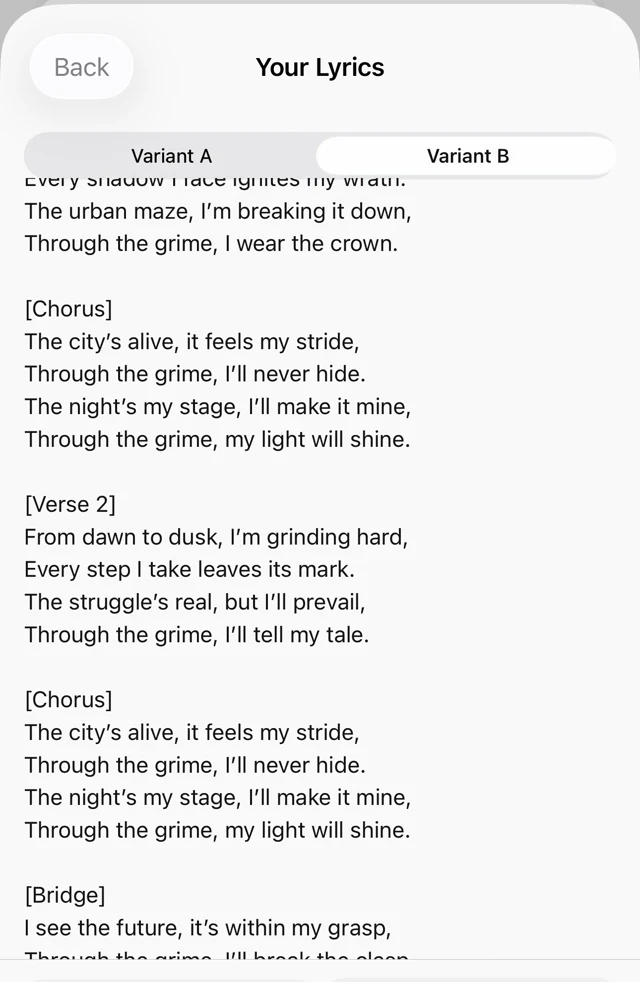
Editable lyrics with Variant A and Variant B
Two lyric drafts to make your own

Suno v6 · guidance from the Apple app

Start with Variety at 0.

Paste Style, Lyrics and Excludes into their matching fields in Suno. Then set the controls in Suno itself:

Variety
0 · Exact style
Style Influence
75–85%
Weirdness
20–30%

Keep My Taste off for this starting point. Follow the song’s guidance for Vocal Gender, Duration and Max Mode where available. These are starting settings from the app; listen and adjust for your track. Copying a prompt does not set Suno’s controls automatically.

Suno also recommends Variety 0 when you want to retain control of your style tags. Read the Suno v6 guide →

Original worked examples

Three ideas. Three clear directions.

These examples were written for this guide. Copy and adapt each block to its matching Suno field; the lyric excerpts show a starting structure, not a complete song or a promised result from the app.

Night-drive synth pop

Idea: A hopeful drive home after a difficult goodbye.

Style

Melodic synth pop, 108 BPM, steady electronic drums, warm bass, bright arpeggiated synths, intimate male lead vocal, restrained verse opening into a wide, hopeful chorus.

Exclude Styles

heavy distortion, shouted vocals, orchestral percussion

Lyrics · short excerpt

[Verse]
The exit signs are counting down
I leave your street beyond the town

[Chorus]
One more mile and I can breathe
The road ahead belongs to me

Why these choices: Tempo and instrumentation establish the pulse; the verse-to-chorus contrast gives the arrangement a direction.

Quiet acoustic folk

Idea: Finding a letter in the kitchen after someone has moved away.

Style

Intimate acoustic folk, 76 BPM, fingerpicked steel-string guitar, soft upright bass, sparse brushed percussion, close female lead vocal, gentle harmonies entering in the chorus, warm natural room sound.

Exclude Styles

EDM drums, distorted guitars, dramatic orchestral build

Lyrics · short excerpt

[Verse]
Your letter waits beside the bread
I read the things we never said

[Chorus]
The kettle sings, the window shines
I make some room between the lines

Why these choices: Specific acoustic instruments and a restrained arrangement leave space for the story and vocal.

Focused boom-bap rap

Idea: Finishing a creative project after months of second-guessing.

Style

Boom-bap hip-hop, 92 BPM, dry punchy drums, rounded bass, dusty piano loop, clear rhythmic rap delivery, compact verses and a memorable spoken hook, minimal melodic layering.

Exclude Styles

sung verses, dense orchestration, rapid trap hi-hats

Lyrics · short excerpt

[Verse]
I kept the rough drafts stacked beside the door
Now every crossed-out line becomes a floor

[Chorus]
One more take, then let it go
Build it in the daylight, let the work show

Why these choices: Delivery and rhythmic density matter as much as the genre. A short hook gives the listener a repeated point of return.

Keep the Style focused on the sound. Put the words and section tags in Lyrics, and unwanted elements in Exclude Styles. For a lyric comparison, explore two drafts of the same idea.
Frequently asked questions

What is a Suno prompt?
A Suno prompt is the style description you give Suno AI to control genre, tempo, mood, vocals and production of the generated song. A detailed style prompt helps you express the direction you want for your song.
Can I copy the style of an existing song?
Paste a supported YouTube link and Prompt Maschine analyzes musical characteristics such as genre, tempo, instruments and structure. Review the analysis, then use it as a starting point for your own style prompt. It describes the sound rather than copying the recording.
Does it also write the lyrics?
Yes. The built-in Lyrics Generator writes original, structure-exact lyrics with bracketed [Verse] and [Chorus] tags that Suno understands, in 8 lyric languages on Apple devices, with A/B lyric drafts.
Is it free?
Free includes 3 generation operations per day. A complete Quick Song with vocals uses 2 operations. On Apple devices, YouTube and audio analysis share 1 free extraction every 72 hours. On Android, YouTube and MP3 analysis each have 1 free try every 3 days. Analyses also count toward the daily allowance. PRO includes unlimited generations and additional tools. Prices and eligible trial offers are shown in the app before purchase.
Does it work with Udio too?
Yes — the prompts are structured descriptions of genre, mood, instrumentation and production, which work in Udio and other AI music tools as well.

New in Prompt Maschine 1.5

Then master it: AI Mastering in Prompt Maschine 1.5

AI Mastering for any finished track: your own mix, a home or band recording, a beat, or a song you made in Suno, Udio or any other tool. Open it, tap Master with AI, and every knob stays yours.

Explore more

Start free — 3 generation operations a day.

Start with the free daily allowance. PRO adds unlimited generations; prices and any eligible offers are shown in the app.

Prompt Maschine creates editable lyrics and music prompts, not audio recordings. AI output needs your review. Independent app; not affiliated with Suno or Udio.