Songwriting with AI

AI Lyrics Generator

Prompt Maschine 1.5 · AI Mastering · Available October 30

Draft lyrics in Prompt Maschine for iPhone and Android. Choose your language, song sections and rhyme settings, then shape the words into your own song.

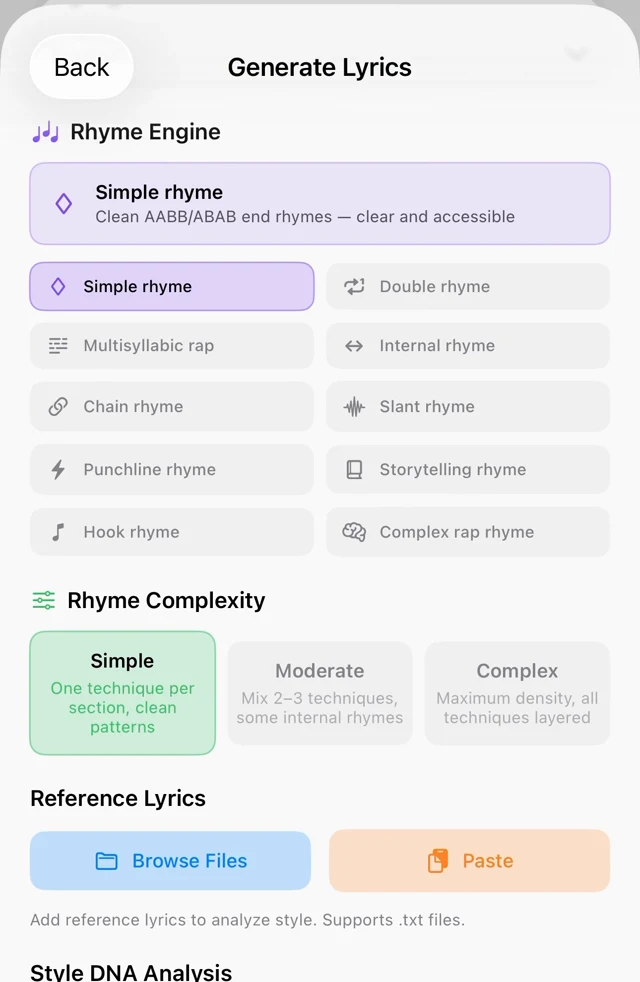
Generic AI lyrics sound generic because the AI decides everything. Prompt Maschine flips that: you build the exact structure from flexible section types — Intro, Verse, Pre-Chorus, Chorus, Post-Chorus, Bridge, Hook, Rap Verse, Drop, Build-Up, Spoken Word and more — choose the writer style, the rhyme system and the language, and the AI writes inside your blueprint.

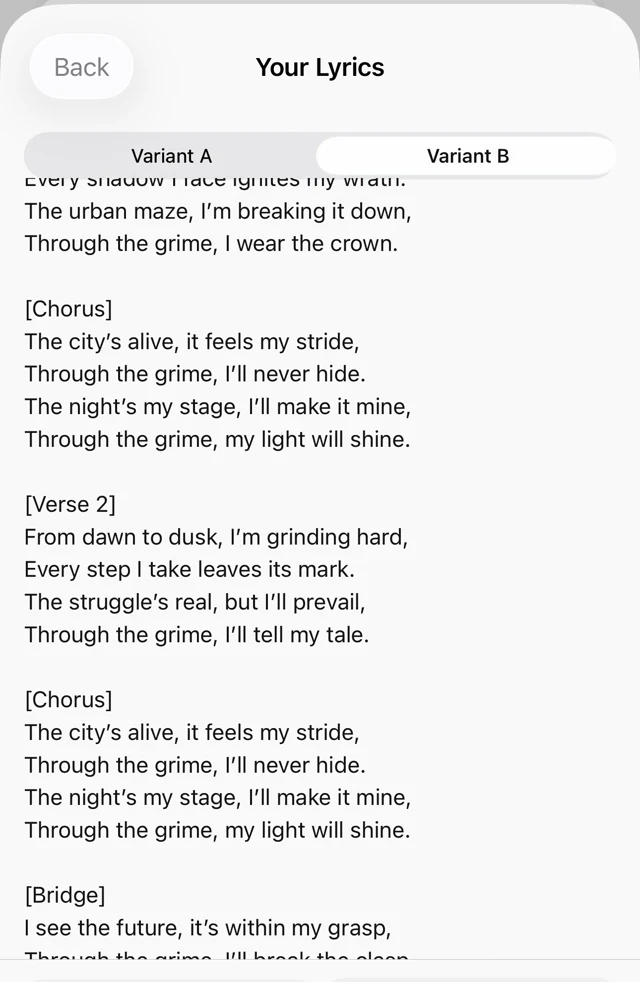
Compare the A and B lyric drafts, then keep the phrases that fit your song. On Apple devices, if only one draft passes the structure check, you can keep that version, try again or cancel. Reference lyrics can also help you explore a Writer Style profile.

How to generate lyrics in the app

Apple app workflow · iPhone, iPad and Mac

1
Choose how to start

Open Generate Lyrics and choose “I have a prompt” or “Start fresh”. Use your existing music prompt or begin with a new idea.

2
Shape the song

Arrange your Song Structure, then write the Theme / Idea. Give the draft a scene, a point of view and a clear direction.

3
Set language and style

Choose Language. Open Show Advanced Options when you want Writer Style, rhyme controls or reference lyrics; rap genres also reveal Rap Flow options.

4
Generate & refine

Tap Generate Lyrics, review the drafts and edit, copy or save your choice. If one draft is incomplete, the app lets you keep the valid version or try again.

Illustrative writing example · original lyrics

One idea. Two ways to shape the lyric.

Start with a specific scene, give it a structure, then compare the choices. These short examples show how the same idea can take a different rhythm and rhyme pattern.

The idea
Leaving a familiar city at sunrise. Keep the voice intimate and hopeful, with everyday details rather than a dramatic farewell.
The structure
One four-line verse, then one four-line chorus. English lyrics. Keep the chorus easy to repeat.

Draft A · paired rhymes

AABB pairs neighboring line endings: line/mine, key/me. The chorus makes a direct, repeatable statement.

[Verse 1]
I fold the map along the line
The road ahead is almost mine
The kettle cools; I leave the key
Beside the life that sheltered me

[Chorus]
Let morning find me past the bend
I have a start, not just an end
With every mile, the sky turns blue
I'm making room for something new
Draft B · alternating rhymes

ABAB connects lines one and three, then two and four: light/night, door/anymore. The scene unfolds between each rhyme.

[Verse 1]
The kitchen window catches light
My ticket rests beside the door
I've kept this leaving packed all night
My coat won't hang here anymore

[Chorus]
Beyond the roofs, the waking sky
Has room for roads I haven't known
I take one breath and say goodbye
Then let the first mile be my own

Make the next edit yours. Keep the image that feels true to your story, replace a general phrase with a detail only you would notice, and read each line aloud. You could pair Draft B's verse with Draft A's chorus, then adjust the wording to fit your melody. When you are ready, prepare a matching Suno style prompt.

What you get

  • flexible section types, reorderable with one tap
  • 10 rhyme engines and 3 complexity levels
  • 5 rap flows: Boom Bap, Trap, Double Time, Slow Flow, Melodic
  • Writer Style profiles from reference lyrics
  • Compare A/B drafts, with a choice to keep one valid draft
  • Suno-ready [Verse] / [Chorus] formatting
Rhyme Engine controls and rhyme complexity options
Choose the rhyme and complexity
Generated lyrics with Variant A and Variant B
Compare two lyric drafts

Frequently asked questions

Are the lyrics original?
The AI creates a new draft from your theme and structure. Reference lyrics guide technique and phrasing. Review the result for originality, accuracy and suitability before using it.
Which languages can it write in?
Choose from languages including English, Spanish, French, German, Italian, Portuguese, Romanian and Danish on Apple devices. AI fluency and phrasing can vary; review the draft in the language you selected.
Can it write rap lyrics?
Yes — rap is where it shines. Five dedicated flow modes (Boom Bap, Trap, Double Time, Slow Flow, Melodic Rap) control syllable counts, bar rules and delivery, plus multisyllabic and complex rap rhyme systems.
How do I use the lyrics in Suno?
Copy the lyrics — they come pre-formatted with bracketed section tags like [Verse] and [Chorus] that Suno reads natively. Generate a matching style prompt in the same app and paste both.
How many lyrics can I generate for free?
Free includes 3 generation operations per day. A complete Quick Song with vocals uses 2 operations. On Apple devices, YouTube and audio analysis share 1 free extraction every 72 hours. On Android, YouTube and MP3 analysis each have 1 free try every 3 days. Analyses also count toward the daily allowance. PRO includes unlimited generations and additional tools. Prices and eligible trial offers are shown in the app before purchase.

New in Prompt Maschine 1.5

Then master it: AI Mastering in Prompt Maschine 1.5

AI Mastering for any finished track: your own mix, a home or band recording, a beat, or a song you made in Suno, Udio or any other tool. Open it, tap Master with AI, and every knob stays yours.

Explore more

Start free — 3 generation operations a day.

Start with the free daily allowance. PRO adds unlimited generations; prices and any eligible offers are shown in the app.

Prompt Maschine creates editable lyrics and music prompts, not audio recordings. AI output needs your review. Independent app; not affiliated with Suno or Udio.