Version 1.4.0 is here · iPhone + Android
Explore what’s new in 1.4.0

Big song ideas.
A steadier studio.

An idea at 2 a.m., a line you have been humming all week. Prompt Maschine turns it into lyrics and a Suno style prompt you can actually use, and keeps every word yours to change. On iPhone and Android.

Read reviews on the App Store
Built for songwriters
Works with Suno, Udio, Kaiber
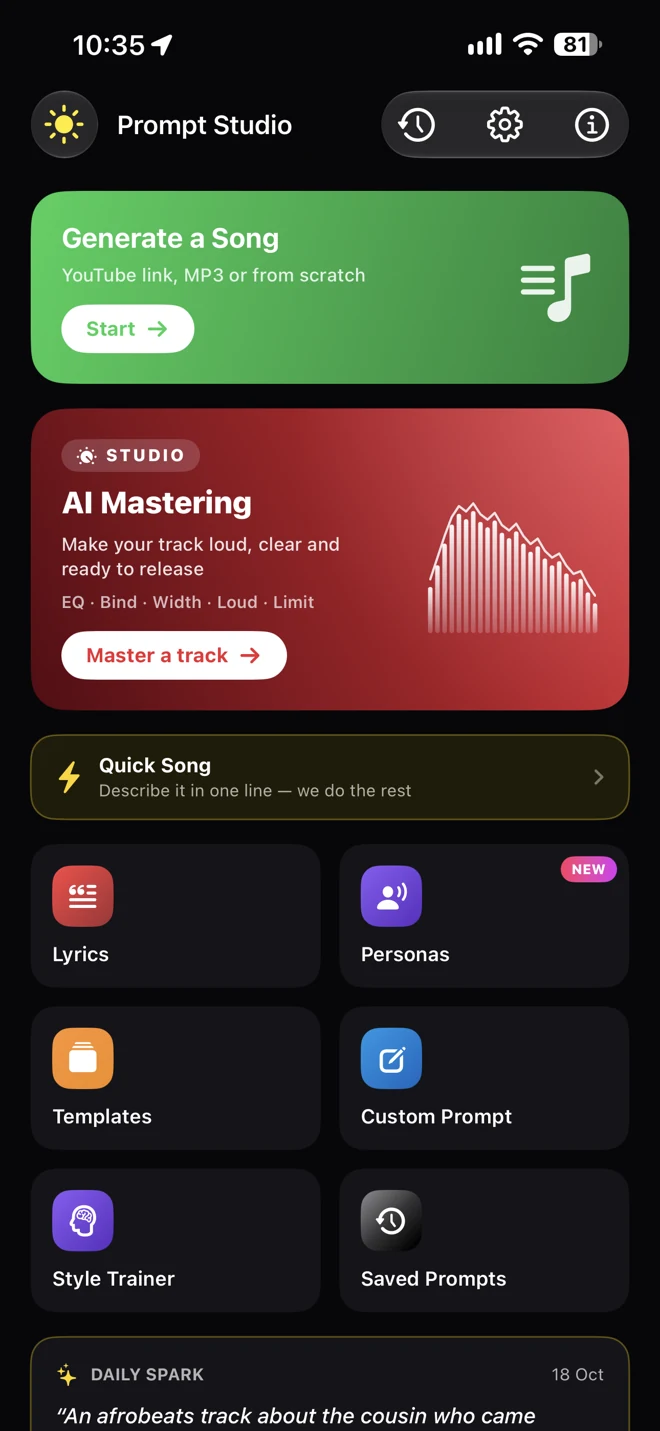
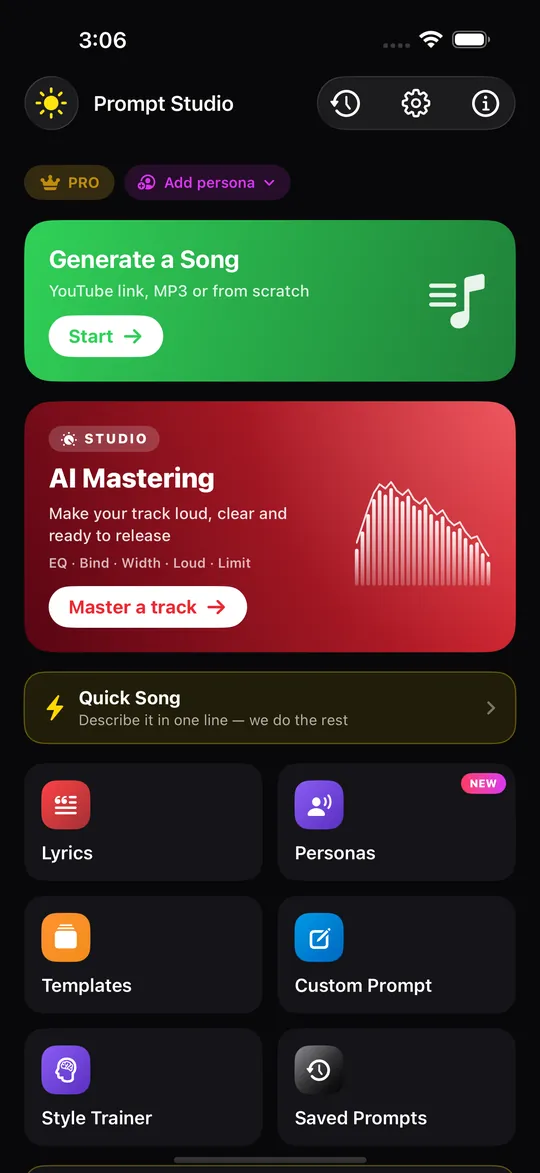
Prompt Studio with Generate a Song, AI Mastering, Quick Song, Lyrics, Personas, Templates, Custom Prompt, Style Trainer and Saved Prompts Coming soon
Built for songwriters using
Suno Udio Kaiber Riffusion Stable Audio

Mastering is coming in the next update · Version 1.5

Your song, mastered.
Right where you wrote it.

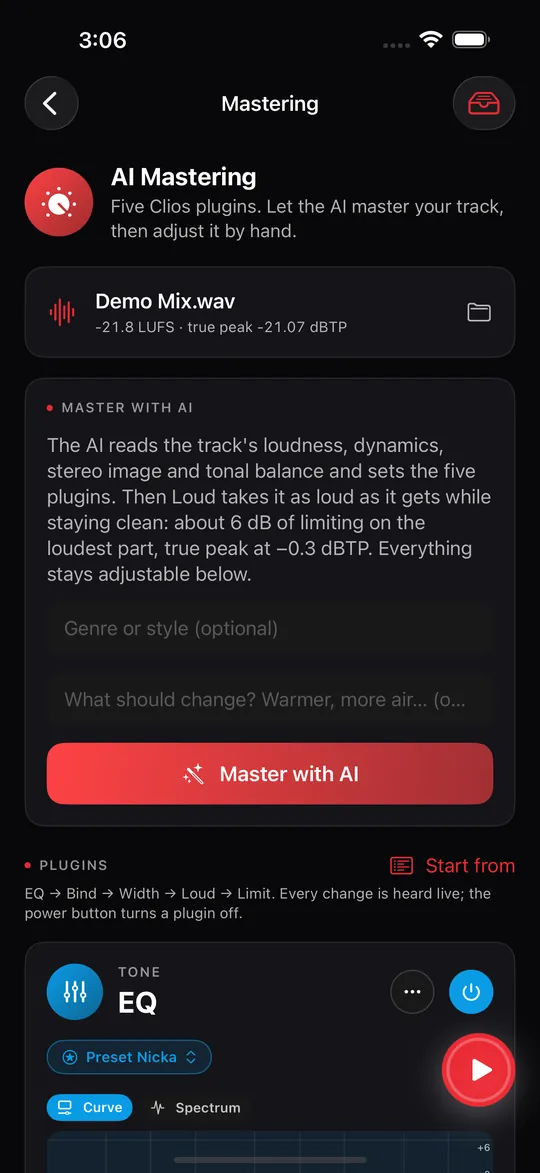
Prompt Maschine 1.5 adds AI Mastering: five Clios plugins inside the app. Bring in the track you generated in Suno and tap Master with AI. The AI reads the track’s loudness, dynamics, stereo image and tonal balance and sets EQ, Bind, Width, Loud and Limit. Then it is yours to adjust by hand, compare with the original at matched loudness, and save as 24-bit WAV or AAC.

Release date to be announced.

Prompt Maschine 1.5 home screen with the AI Mastering card
AI Mastering on the home screen
The Mastering screen: Master with AI, with optional genre and notes
Master with AI
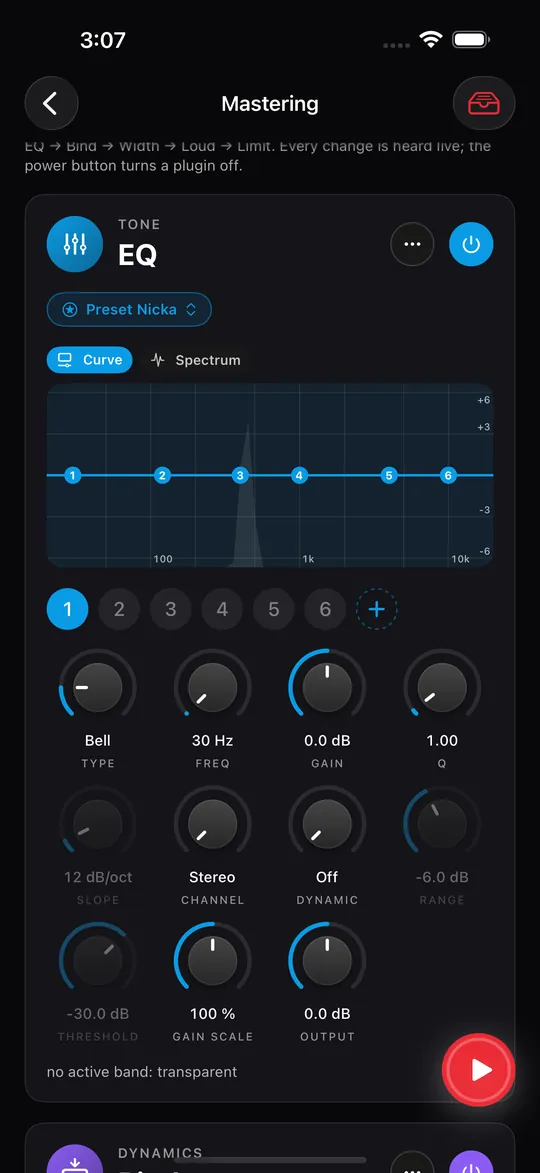
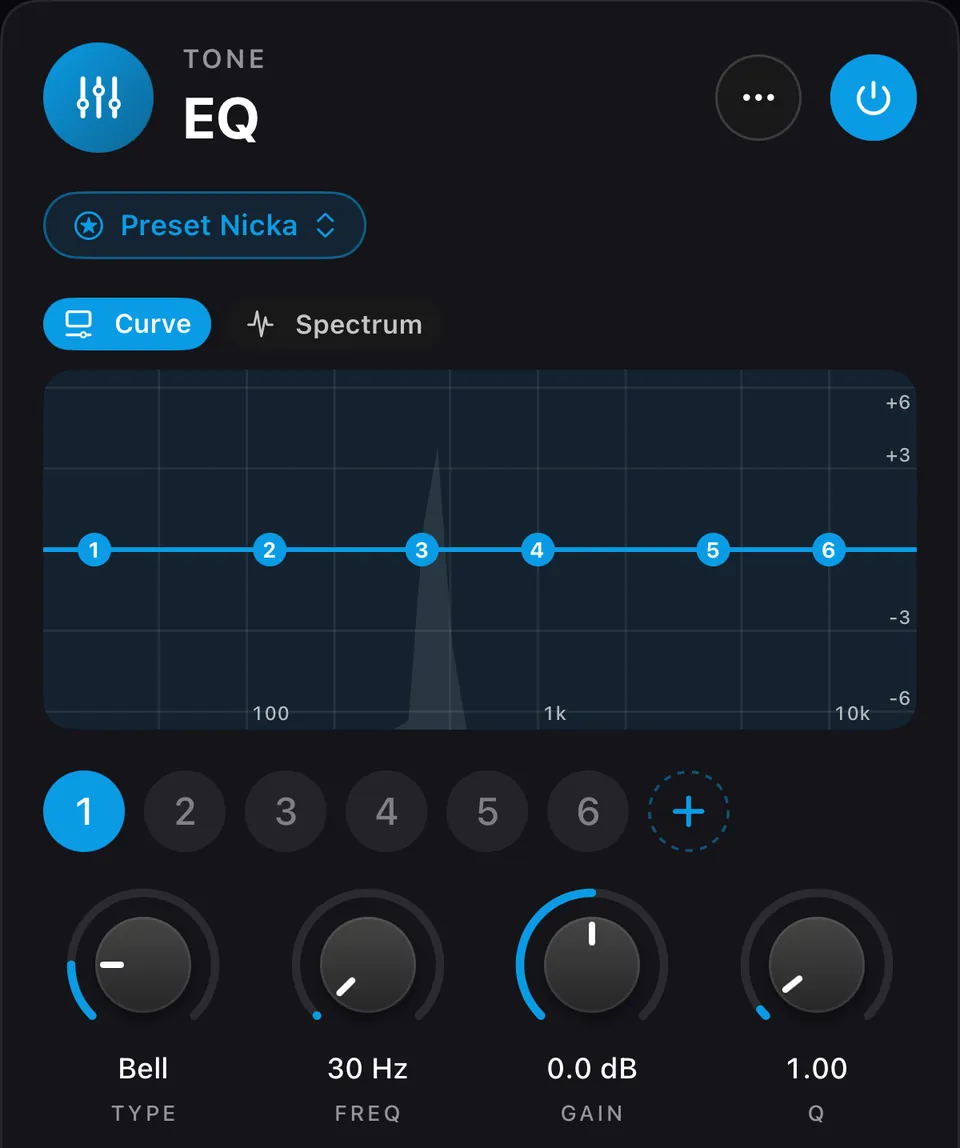
The Clios EQ plugin inside Prompt Maschine
EQ
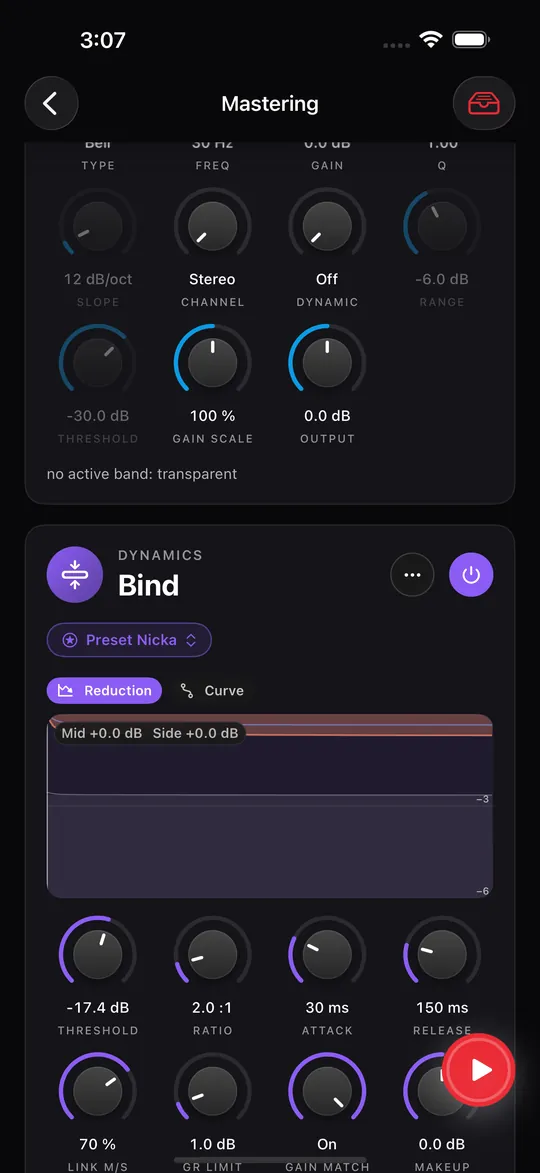
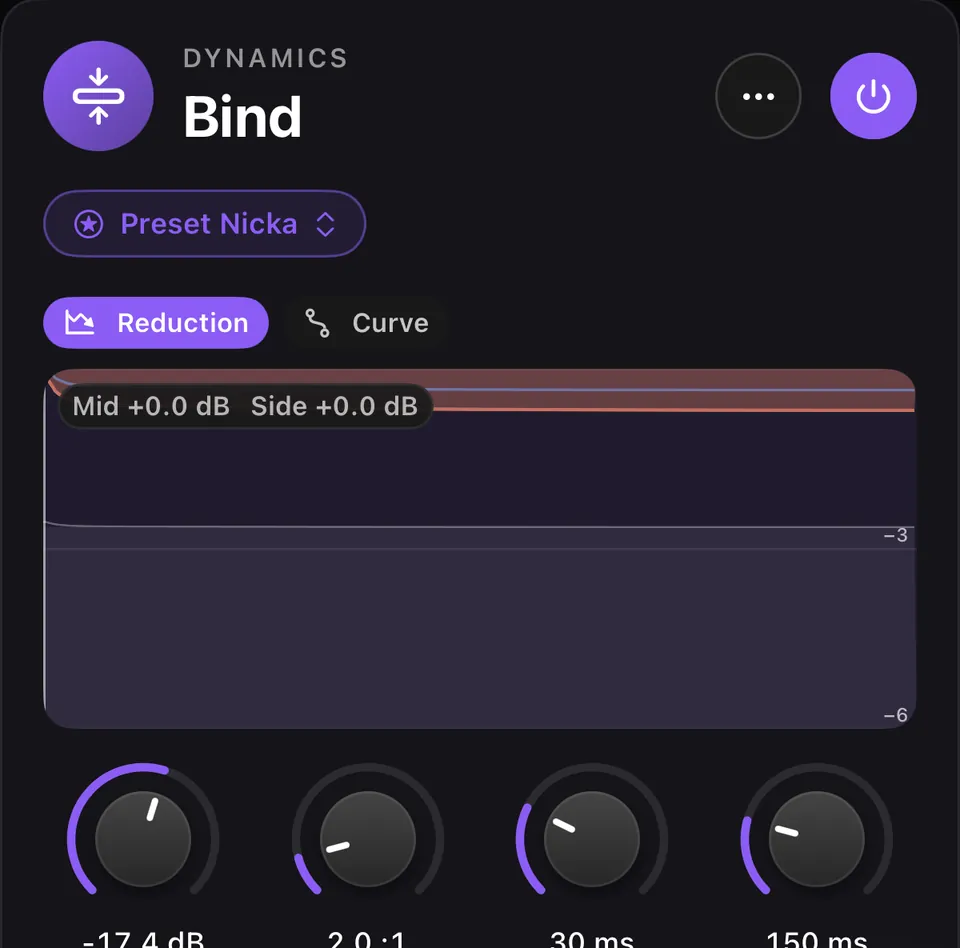
The Clios Bind glue compressor inside Prompt Maschine
Bind
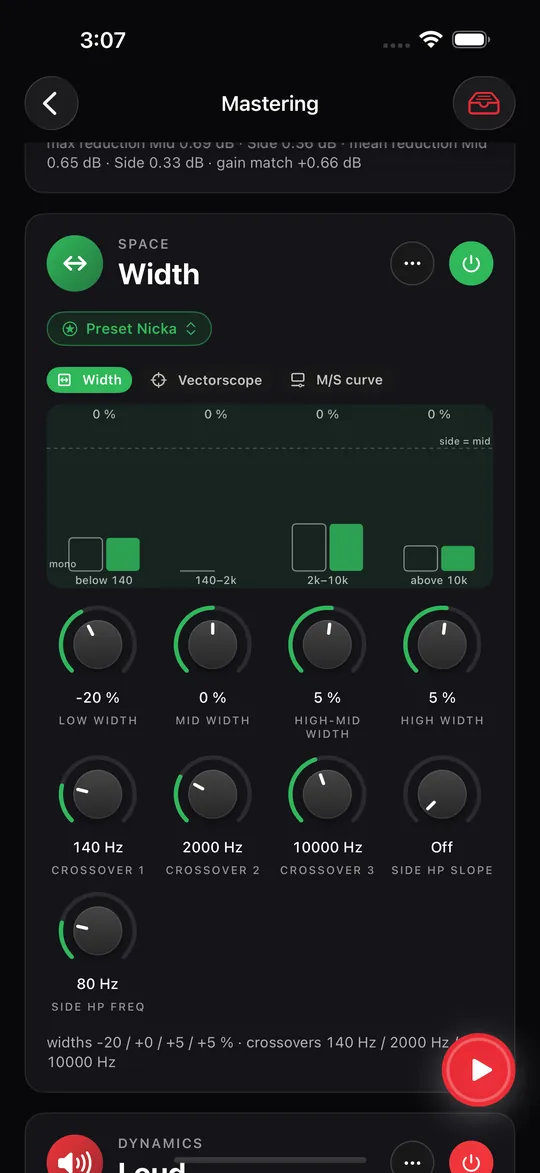
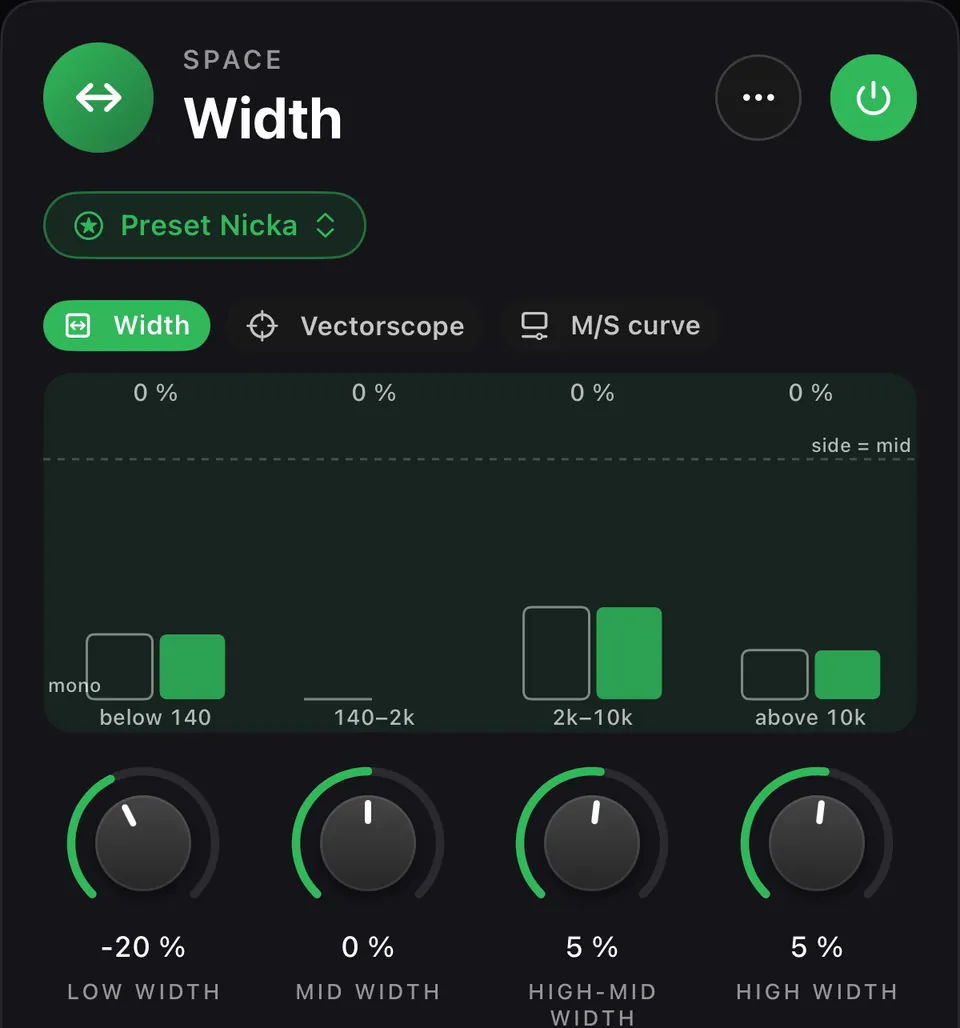
The Clios Width plugin inside Prompt Maschine
Width
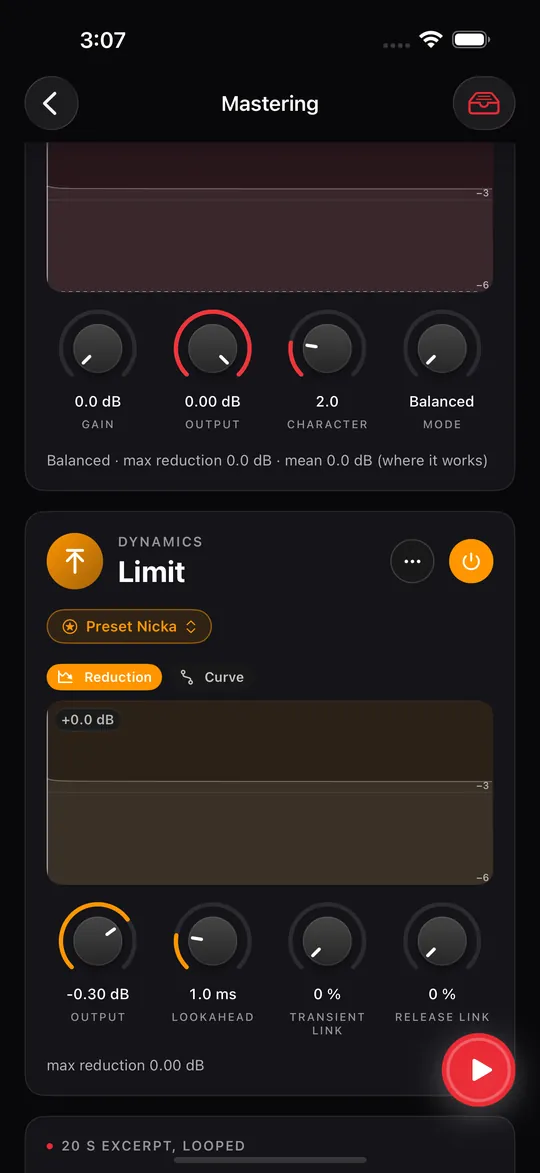
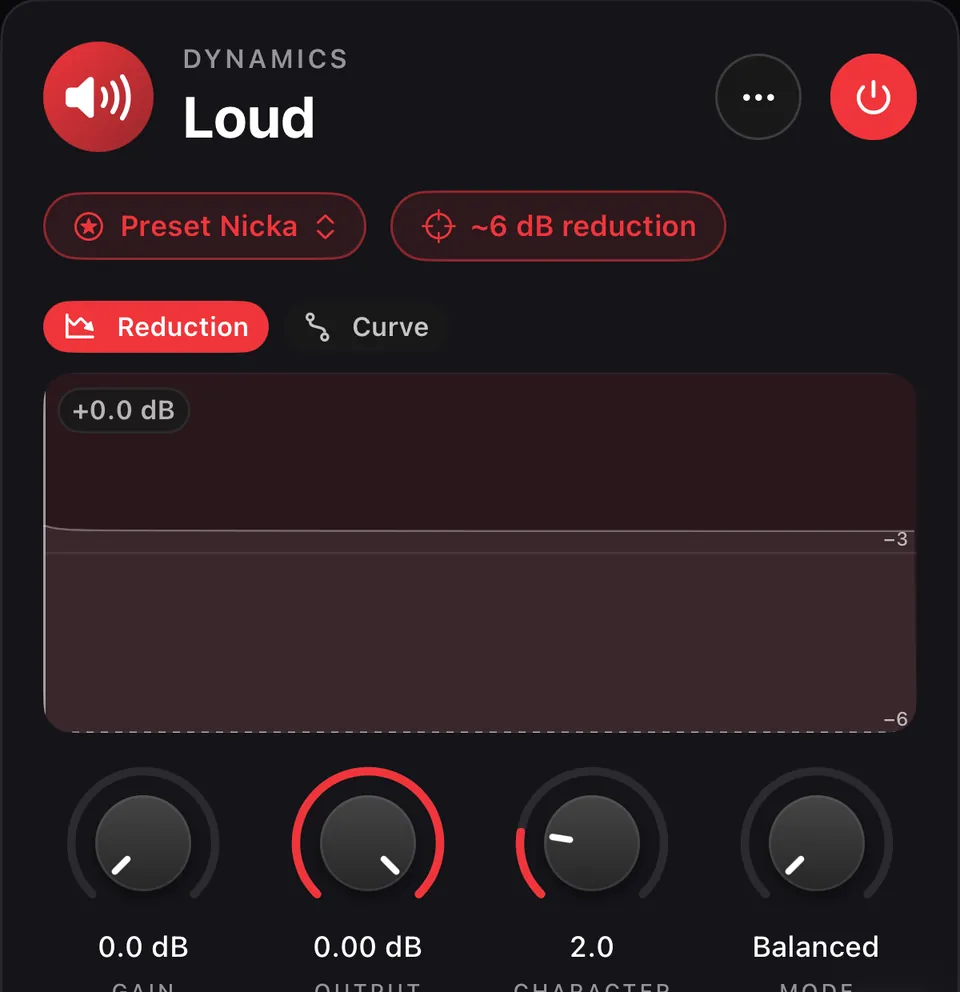
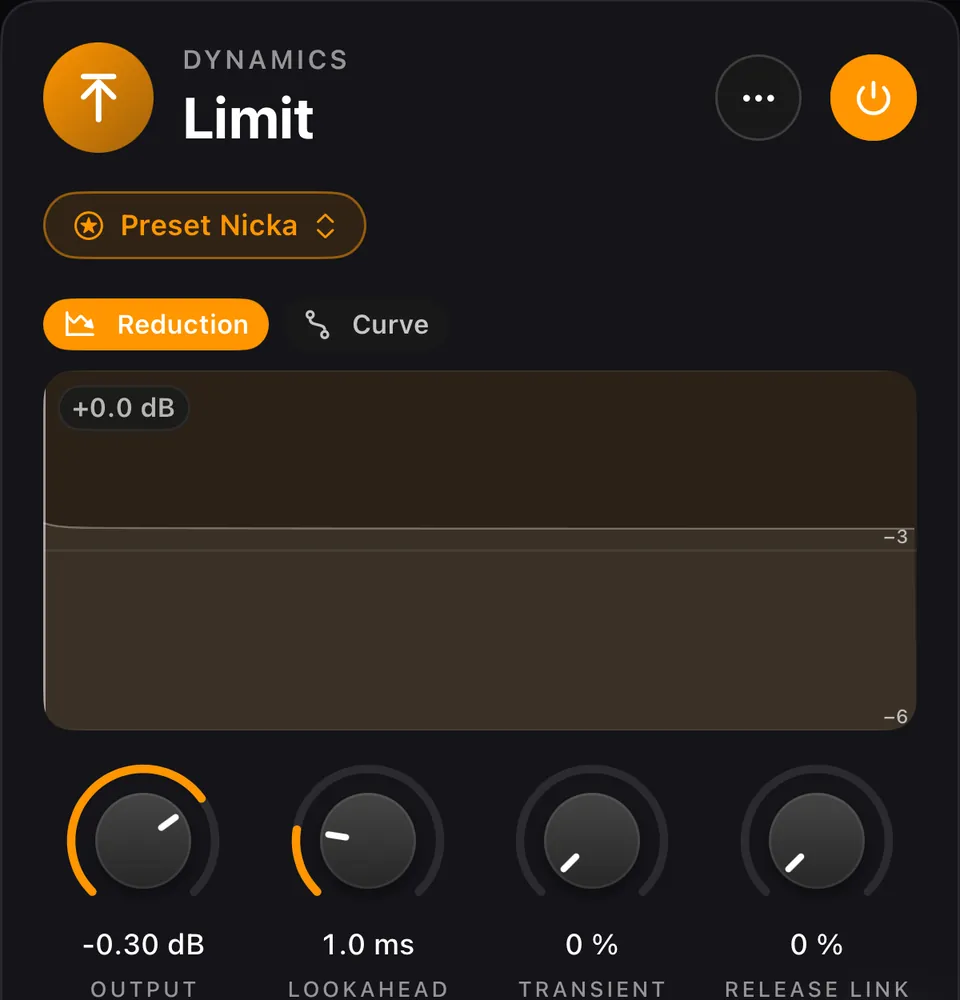
The Clios Loud maximizer and Limit true-peak limiter inside Prompt Maschine
Loud and Limit
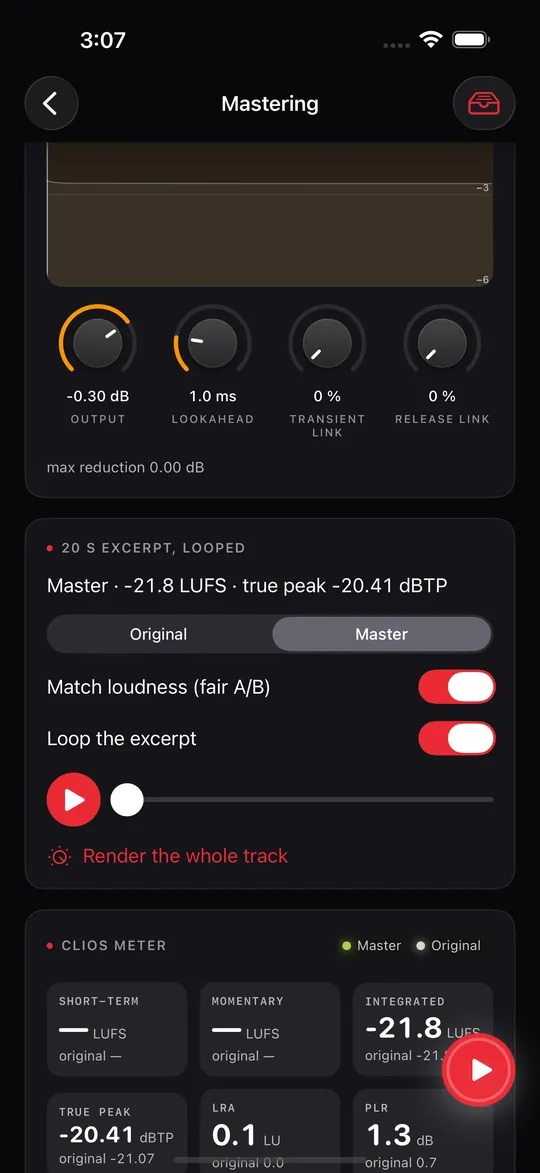
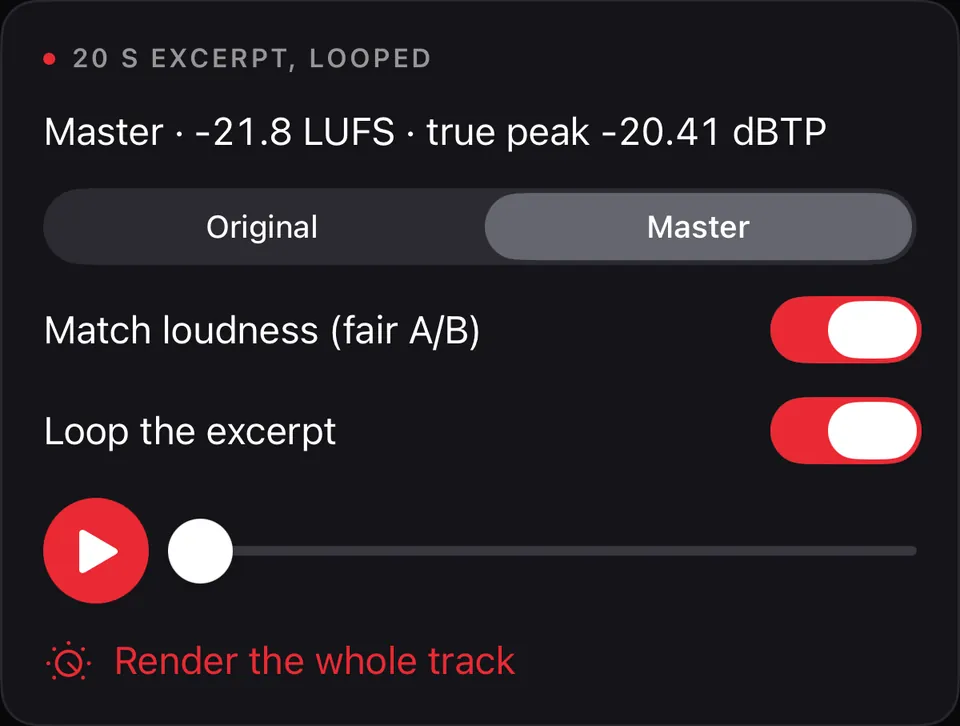
Listen card: original and master at matched loudness, render the whole track
Original or master
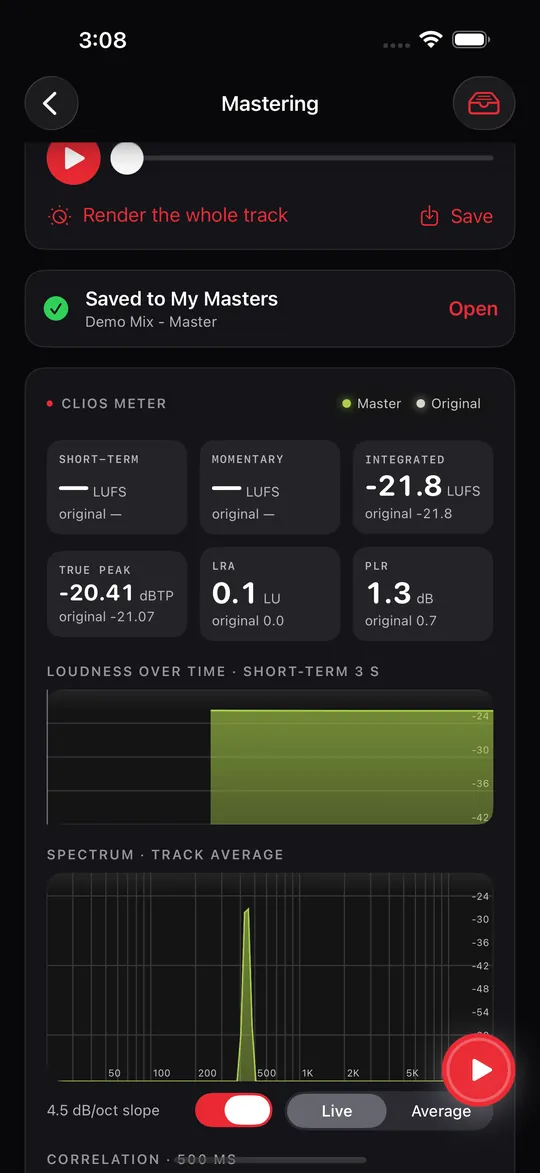
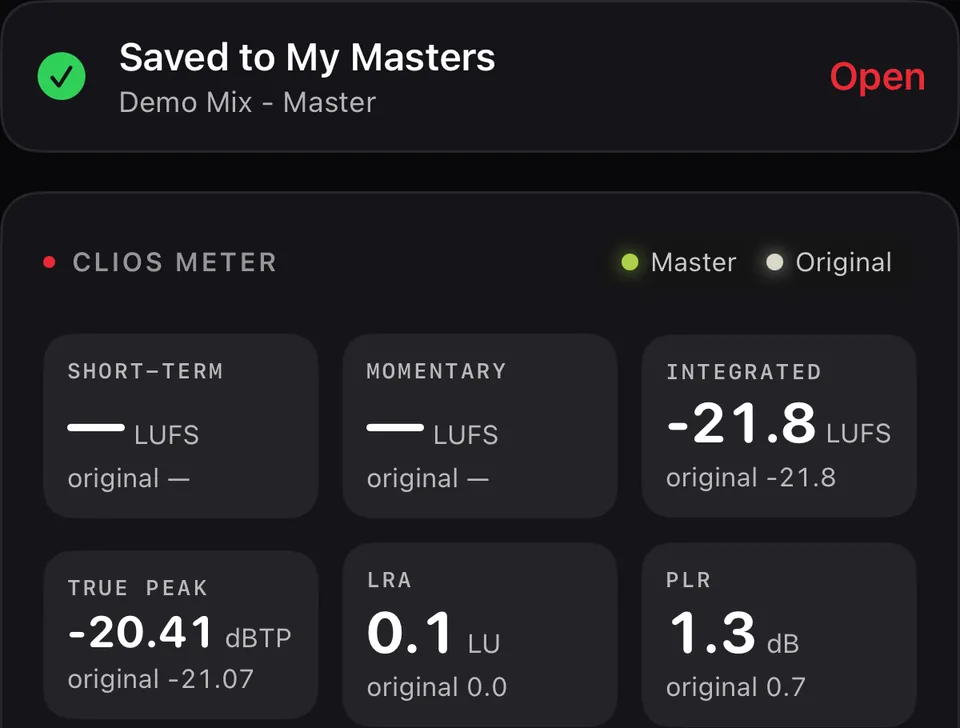
Saved to My Masters, with the Clios Meter below
Saved to My Masters

Drag to see more. Screens from the Prompt Maschine 1.5 build on iPhone, October 2026.

Five Clios plugins, in the order the AI sets them

Clios is the family of audio tools Traian has been building alongside Prompt Maschine. Five of them ship inside 1.5. Every change is heard live, and the power button turns a plugin off.

  1. Clios EQ inside Prompt Maschine 1.501Clios EQ24-band dynamic equalizer

    Bells, shelves, cuts and notches; bell and shelf bands can respond to level. Start from the AI’s curve or set your own.

  2. Clios Bind inside Prompt Maschine 1.502Clios BindMid/Side glue compressor

    A restrained compressor that joins the mix without flattening its movement, with a limit on how much it reduces.

  3. Clios Width inside Prompt Maschine 1.503Clios WidthMultiband stereo width

    Stereo width set separately in four frequency regions, so the deepest bass can stay in the centre.

  4. Clios Loud inside Prompt Maschine 1.504Clios LoudMastering maximizer

    The main loudness stage. When the AI sets it: about 6 dB of limiting on the loudest part, in Balanced or Clipping mode.

  5. Clios Limit inside Prompt Maschine 1.505Clios LimitTrue-peak limiter

    Catches inter-sample peaks and sets the final ceiling: −0.3 dBTP when the AI sets it.

Listen. Save. Share.

Listen card: 20-second excerpt looped, original or master, match loudness, render the whole track
Listen A 20-second excerpt, looped. Switch between original and master at matched loudness, then render the whole track.
Saved to My Masters, with the Clios Meter showing master and original
Save Every master you render goes to My Masters, with the Clios Meter reading master against original.
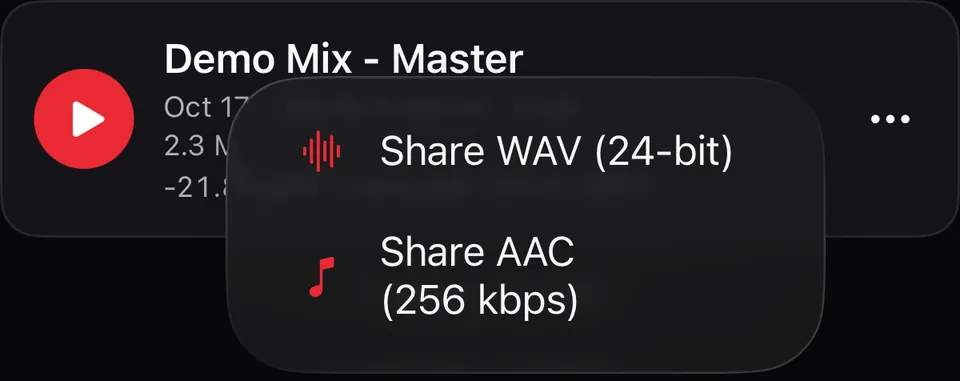
Share menu: Share WAV (24-bit) or Share AAC (256 kbps)
Share 24-bit WAV or AAC at 256 kbps, to Files or any app.
Read current App Store reviews

Loved by songwriters.

Real people, real reviews, from the App Store and Google Play, quoted as they wrote them.

“Like having a full orchestra, a DJ, and a mad scientist all rolled into one — right in your pocket.”
Tiparone · App Store review
“The interface is clean and easy to navigate, and I like how you can customize everything — from song structure to rhyme style.”
alv8mm33na · App Store review
“Clean, intuitive interface with a workflow that actually makes sense. The Lyrics Style Trainer is the highlight.”
Cristicristian · App Store review
“What stands out immediately is how intuitive it is. You don’t need to be a musician or understand production.”
jorjelgt · App Store review
★★★★★
“It works amazing with Suno.”
Reflector4 · App Store review
★★★★★
“Changed my way of creating music with Suno.”
TomyRoll · App Store review
★★★★★
“Highly recommend if you're into AI music or just want inspiration fast.”
iMedv · App Store review
★★★★★
“It lets you save your best prompts, remix them, and reuse them without the usual copy-paste chaos.”
Jaxxibooii · App Store review
“I find this app to be a game changer. It does exactly what it promises to do. Well Done!!!”
BSD ROK · Google Play review, August 2026
“…if you are a creator and get lost for words or not sure the sound you want for the lyrics you wrote you can tweak it here…”
Elliott R Palmer Jr. · Google Play review, August 2026
“I definitely see it as an essential tool addon to the tool set. Ya I'm that impressed.”
Lawnmower Repairs · Google Play review, August 2026

Featured mentions

Prompt Maschine
in the spotlight.

Explore 15 guides, comparisons and product profiles featuring Prompt Maschine, with links to the original sources.

DocumentaryTube

Rap songwriting guide · September 27, 2026

11 Best AI Rap Song Prompt Tools For 2026

Highlights Prompt Maschine for pairing rap lyric drafts with a matching music-style prompt.

Included in the publication’s 11-tool guide.

Read the article

Sekin

Lyric-writing guide · September 27, 2026

How To Write Advanced Custom Lyrics With AI Assistance

Includes Prompt Maschine in a practical workflow for song structure, rhyme and rap-flow choices.

A guide based on listed product capabilities.

Read the article

The Geeks Club

German rap guide · Updated October 9, 2026

Best AI Rap Lyric Generators in German for Developers (2026)

Features Prompt Maschine for German rap-writing controls, song sections and rhyme options.

Published September 26, 2026; updated October 9.

Read the article

MobilesTalk

Songwriting app guide · September 27, 2026

11 Best AI Lyric Studio Apps For Songwriters In 2026

Features Prompt Maschine for structured lyric drafts and rap-flow controls on your phone.

Included in the publication’s 11-app guide.

Read the article

iTechGuides

Rap prompt guide · September 27, 2026

8 Best AI Rap Song Prompt Tools For 2026

Includes Prompt Maschine for combining rap lyric drafts with detailed music-style prompts.

A separate article from the product profile linked below.

Read the article

UMA Technology

Category ranking · Checked October 10, 2026

Best AI Lyric Generators in 2026

Lists Prompt Maschine among tools for editable lyric drafts and music prompts.

A product-fit ranking based on maker-published information.

Explore the ranking
More articles and comparisons · 9

MobilesTalk

Mobile rap guide · September 27, 2026

9 Best AI Rap Songwriting Tools for Your Phone in 2026

Highlights flow, rhyme and song-structure tools for writing rap lyrics.

Included in the publication’s nine-tool guide.

Read the article

MobilesTalk

Rap-writing guide · September 27, 2026

How To Develop Rap Rhymes With AI On Your Phone

A practical rap-writing guide that includes Prompt Maschine’s rhyme and flow tools.

A workflow guide based on listed product capabilities.

Read the article

TechYorker

Rap lyrics guide · September 26, 2026

Best AI Rap Lyrics Generators for 2026

Features Prompt Maschine’s approach to rap flow, rhyme and song structure.

Includes a dedicated section on the app’s writing controls.

Read the article

TechYorker

Rap songwriting guide · September 27, 2026

11 Best AI Rap Song Prompt Tools for 2026

Listed #1 in this guide, highlighting rap-flow choices and style prompts for Suno.

Position in TechYorker’s specific 11-tool list.

Read the rap guide

TechYorker

German rap guide · September 27, 2026

4 Best German AI Rap Lyric Generators in 2026

Listed #1 in this guide for German rap writing control, with language guidance, flow modes and rhyme tools.

Position in TechYorker’s specific four-tool list.

Read the German rap guide

MobilesTalk

Mobile songwriting guide · September 27, 2026

3 Custom Song Brief Generators Worth Trying on Your Phone in 2026

Featured among three mobile song-brief tools for two lyric variants and a style prompt for Suno.

The article compares brief-building workflows.

Read the mobile guide

GeekChamp

Article

AI Songwriters That Learn Your Musical Style: Suno vs. Prompt Maschine

A look at two creative starting points: audio-led song generation and lyric-based writer profiles.

Based on published product information.

Read the article

TechYorker

Product comparison

Prompt Maschine vs SongAI

Compares the apps’ listed features, pricing and supported platforms to help readers explore their options.

Based on the makers’ own product pages.

Read the comparison

iTechGuides

Product profile

Prompt Maschine Review (2026): Pricing, Pros & Cons

An overview of the lyric toolkit, with listed features, pricing and alternatives for songwriters using AI music platforms.

Product information and editorial assessment.

Explore the overview

Rankings refer to each publication’s own list. Several publications belong to Yorker Media. Read the original pages for their scope and methodology. For current feature access and offers, see Free vs PRO.

A powerful AI prompt generator
and lyrics studio for modern songwriters.

Use a YouTube link as a starting point for a music reference: genre, structure, instrumentation, vocals and tempo. Review the AI analysis before using it.

Everything in one app

A full studio for AI music, in your pocket.

Your writing tools, together in one app. Build lyrics and a style prompt, then take them into Suno or your chosen music tool to create the audio.

Quick Song

iPhone · iPad · Mac · Android

One sentence becomes a style prompt, exclusions and two lyric drafts, in the language of your idea.

Vocal Personas

iPhone · iPad · Mac · Android

Capture a Vocal Persona per song and add its photo directly from Files.

Suno v5 & v6 ready

iPhone · iPad · Mac

A 1,000-character Style guard, performance markup and per-song guidance for Suno v6 settings.

Fix common Suno issues

iPhone · iPad · Mac

One-tap prompt fixes plus “Make it unique” arrangement ideas that respect your genre.

15 Exclusion Controls

iPhone · iPad · Mac · Android

Control unwanted elements and find conflicts between your prompt and exclusions.

A more natural lyric engine

iPhone · iPad · Mac · Android

Meaning before forced rhyme, line limits from your idea and language labels for bilingual sections.

Romanian folk

iPhone · iPad · Mac · Android

Doina, horă, sârbă and colindă, with eight regions and regional ensembles.

YouTube → Generate AI Prompt

iPhone · iPad · Mac · Android

Genre, tempo and voice follow the pasted song link, including links shared from other apps.

At home on Mac

Mac · Apple Silicon

A three-column workspace, larger text, hover effects and ⌘N / ⌘⇧C / ⌘S shortcuts.

12 interface languages

iPhone · iPad · Mac

English plus 11 localizations, including Danish. Eight lyric languages plus Bilingual on Apple devices.

Generate Lyrics

Build your exact song structure from flexible section types, give it a theme, and get two complete lyric variants that follow it line by line — tagged the way Suno expects.

Lyrics Style Trainer

Paste 4–8 lines of lyrics you love. The app extracts tone, themes, rhyme style, vocabulary, cadence and signature elements into a reusable writer profile — in 10 languages.

AI Prompt Generator

Turn a rough idea into a studio-ready prompt — genre, mood, instrumentation, tempo, groove, era influence and production notes. 12 moods, 5 vocal options, 8 lyric languages on Apple devices.

YouTube reference analysis

YouTube Song Analysis

Start with a supported YouTube link, including Shorts. Explore the reference, review the analysis, and shape an editable music style prompt for your own song.

Your language. Your voice.

Write in your chosen language or shape a bilingual song. Apple devices support eight lyric languages, including Danish. Refine the words, rhyme and voice around your idea.

Audio Upload Analysis

Upload any audio file — a demo, a beat, a voice memo. The app detects its vibe, mood, groove, tempo feel and production character, then fills the generator for you.
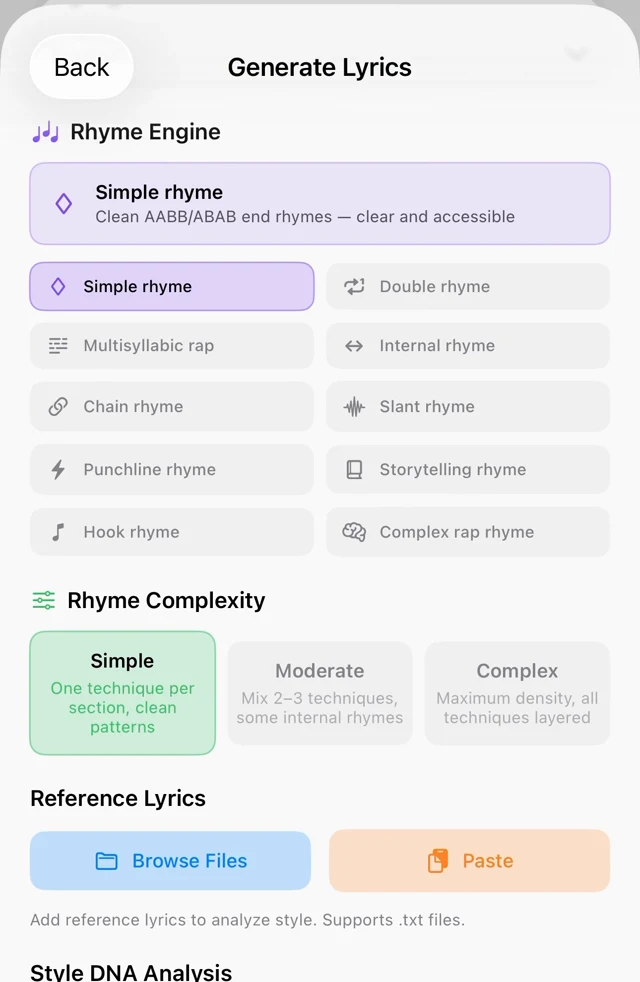
Rhyme Engine
10 rhyme systems, 3 complexity levels

From Simple to Complex rap rhyme, auto-matched to your genre. Five dedicated rap flows: Boom Bap, Trap, Double Time, Slow Flow, Melodic.

Style DNA
Learn from reference writing styles

Scan your reference lyrics for dominant style, emotional tone, hook style, imagery and verse density — to guide your next draft. Review results for similarity before use.

Inside the app

See it in action.

The writing workflow, from a reference idea to lyrics you can edit. Screens from the iPhone build of Prompt Maschine 1.5; Android layout may differ.

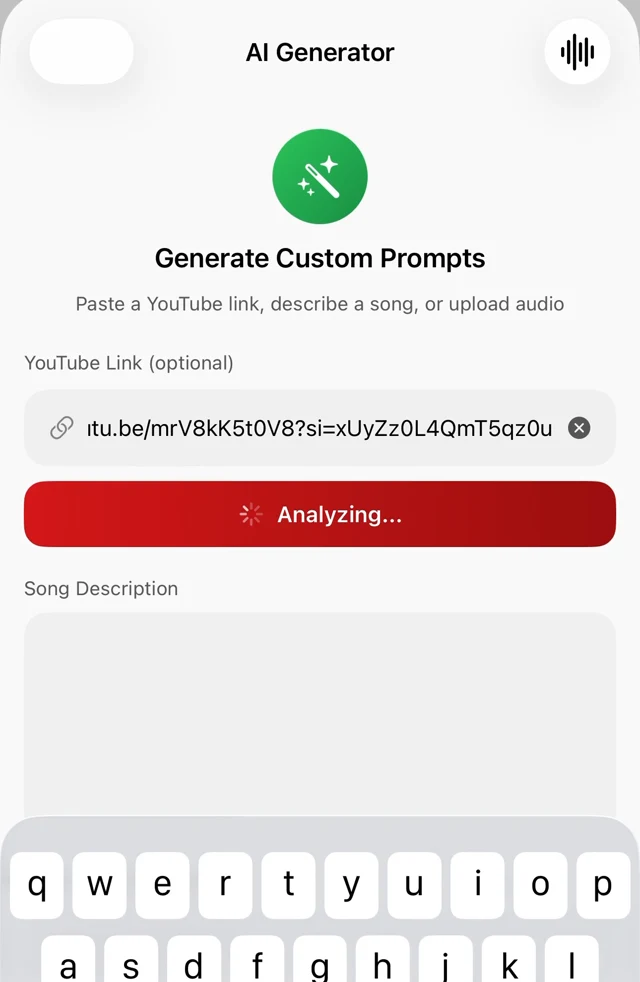
Generate a Song screen with a YouTube link pasted and the Analyze YouTube Link button
AI Prompt Generator
Paste a YouTube link, tap Analyze
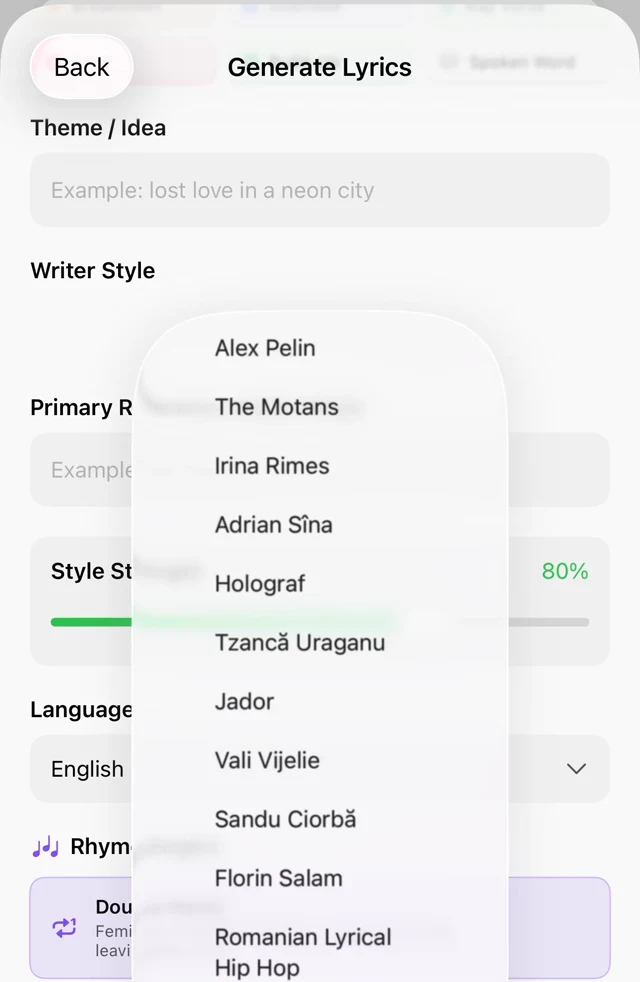
Writer Style picker open, listing the preset writers
Writer styles
Preset writers, or profiles you train yourself
Humanizer toggle and the Rhyme Engine with ten rhyme systems and three complexity levels
Rhyme Engine
10 rhyme systems, 3 complexity levels
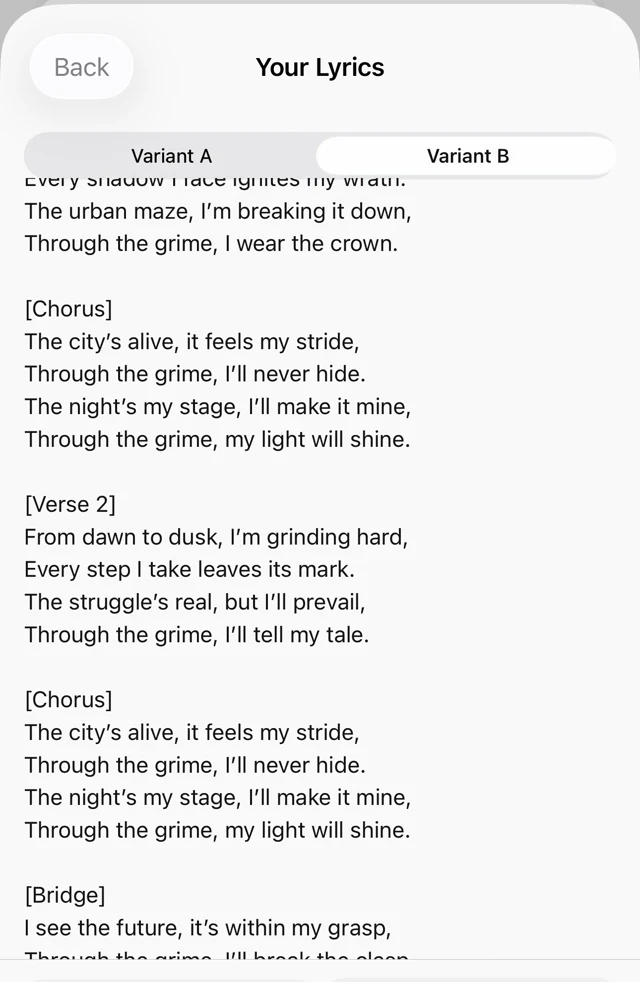
Your Lyrics screen with Variant A and Variant B tabs, copy, edit, rhymes and save actions
Two variants
Variant A / B — copy, edit, rhymes, save

Swipe to see more →

Prompt Maschine 1.4.0 · iPhone + Android

More flow.
Less friction.

Improved stability. More room for your ideas. A writing studio built to help you stay with the song.

Make it yours

Edit your lyrics and style prompts. Compare two lyric drafts, shape the structure, and keep the lines you love.

Write across languages

Choose your language or build a bilingual song. Refine the words, rhyme and voice around your idea.

Keep your momentum

Start from an idea or a YouTube reference. Save your projects and return to your lyrics and style prompts when inspiration comes back.

“The songs I’ve made with this workflow have turned out fantastic.”
Traian Arion · Creator of Prompt Maschine · Personal experience
How it works

From idea to finished song
in three steps.

No workflow to learn. Open the app, describe what you want, and copy the result straight into Suno or Udio.

💡 Your idea Prompt Maschine Suno / Udio 🎵 Finished track
1
Describe

Tell it your idea

Type a sentence, paste a YouTube link, or drop reference lyrics. That's enough to get started.

Theme
late-night drive through a neon city, missing someone
Reference
youtube.com/watch?v=...
2
Shape

Pick your style & structure

Genre, mood, BPM, rhyme complexity, voice per section. Dial it in or let the presets do it.

Synthwave Nostalgic 110 BPM Male vocals Complex rhyme English + ES
3
Generate

Copy. Paste. Ship.

Lyrics with proper section tags, a Suno-ready prompt, or both. One tap to copy, one paste to generate.

[Intro]
Headlights bleeding into the rain…
[Verse 1 — Male]
City lights blur past the glass again…
Copy to clipboard
Before & After

From a first idea to
lyrics you can shape.

Give your idea a song structure. Compare two lyric drafts and make every line your own.

Before
Your rough idea
> a sad synthwave song about
  driving alone at night,
  missing someone from the 80s
15 seconds of typing
After
Polished & tagged
Lyrics
[Intro]
Static on the radio, asphalt ghosts,
Dashboard glow is all the company I've got.
[Verse 1 — Male]
Miles of midnight, taillights turning red,
Your name still rattles in the back of my head.
[Chorus — Male]
Neon and regret, 1985,
I'm chasing every memory I left alive…
[Verse 2] · [Chorus] · [Bridge] · [Outro]
Ready for Suno & Udio
Editable in the app

I built Prompt Maschine for my own songs first. I wanted one place where an idea becomes lyrics and a style prompt I can paste straight into Suno, without the back-and-forth between three apps.

Mastering was always the missing piece. For a long time I have been building Clios, my own set of audio tools, to finish tracks the way I hear them. Version 1.5 brings five of them into the app, with an AI that sets them for your track, so the song you write here can also be the song you release.

If something feels off, or you know what I should build next, write to me.

Traian ArionFounder of Prompt Maschine
hello@promptmaschine.com

Creator-recommended starting point

Give your song a clear direction.

After copying your Style and Lyrics into Suno, try Traian Arion’s starting settings for this workflow:

Style Influence
80–100%
Weirdness
Low / near 0
Audio Influence
0%

Use these controls where available in Suno. These are the creator’s preferred starting settings; adjust for your song and listen to the result.

Pricing

Start free. Go PRO
when you're making songs.

Try it with 3 free generation operations a day. Upgrade anytime — cancel anytime.

Free
$0 / free plan

Start writing with the free daily allowance.

  • 3 generation operations per day
  • Prompt and lyric generation within the daily allowance
  • A/B lyric drafts
  • Saved library (local)
Download free
Most popular
PRO Monthly

US App Store · USD

$9.99 / month

Unlimited generations. Cancel anytime.

  • Unlimited generations
  • Full Prompt Validator and Style Trainer on Apple devices
  • Unlimited YouTube & audio analyses
  • Premium AI for lyrics on Apple devices
  • Trial offers for eligible accounts only
  • Cancel anytime through the App Store or Google Play, depending on where you subscribed
Get PRO Monthly
Save about 50%
PRO Yearly

US App Store · USD

$59.99 / year

Works out to $5/month. Best value.

  • Everything in PRO Monthly
  • Unlimited generations, all year
  • Same PRO features, billed annually
  • Trial offers for eligible accounts only
Get PRO Yearly

The prices above are for the US App Store. Android prices and offers are shown in Google Play inside the app. Prices, taxes, trials and available plans vary by storefront and region and are shown before purchase. Subscriptions renew automatically unless canceled through the store where you subscribed. Apple purchases are managed through your Apple Account; Android purchases are managed through Google Play.
Plan availability may differ between Apple platforms and Android. Your storefront shows the exact local price, billing period and trial eligibility before you confirm.

Free vs PRO — what is included

Apple app · iPhone, iPad and Mac · Current version 1.4

Features included in the Free and PRO plans on Apple devices
What you getFreePRO
Generation operations3 per dayUnlimited
Quick Song with vocalsUses 2 daily operations: prompt + lyricsIncluded, without the Free daily cap
YouTube + audio analysis1 shared extraction every 72 hours; also uses a daily operationUnlimited analyses
Lyrics and music promptsIncluded within the daily allowanceUnlimited, with premium AI for lyrics
A/B lyric draftsIncluded; keep the usable draft if one is incompleteIncluded
15 built-in exclusion controls + conflict detectionIncludedIncluded
Custom typed exclusionsRequires PROIncluded
Prompt Validator / debuggerScore, summary and first issueFull details
Style Trainer & Style DNARequires PROIncluded
Built-in writer presetsBasic presetsBasic and premium presets
Vocal Personas1 personaUnlimited personas
Rhyme Assistant + Rap Flow modesIncludedIncluded
Saved library on your deviceIncludedIncluded

A generation operation is one prompt or lyric generation, or one analysis. Quick Song with vocals combines a prompt and lyrics, using two operations. The free writing allowance resets daily.

On Android

Free includes 3 generation operations a day. A complete Quick Song with vocals uses 2. YouTube and MP3 analysis each include 1 free try every 3 days, within that daily allowance. PRO unlocks unlimited generations and additional tools. The Android app shows its current feature access, Google Play prices and eligible offers before purchase.

Coming in 1.5 · Apple devices

Mastering, on both plans

Free: 1 AI master per day. PRO: unlimited AI masters. This is separate from the writing allowance. Both plans include manual EQ, Bind, Width, Loud and Limit, the meter, and WAV or AAC export.

Release date to be announced. Explore the upcoming mastering tools →

FAQ

Questions, answered.

What is Quick Song?
Quick Song turns one sentence into a music style prompt, exclusions and full A/B lyric drafts. On Apple devices, it follows the language of your idea and uses your selected Vocal Persona. Review, edit and copy the text into Suno or your preferred music service.
Is it ready for Suno v6?
Yes. On iPhone, iPad and Mac, Prompt Maschine provides per-song guidance for Variety, Vocal Gender, Duration and Max Mode. Its Style guard fits the 1,000-character field while retaining your full master. Copy your text and apply the recommended settings in Suno.
What is Prompt Maschine?
Prompt Maschine is a full AI lyrics & prompt studio for Android and Apple devices. You describe a song idea, pick your style, and the app hands you editable lyric drafts plus a pro-grade prompt for Suno, Udio, and other AI music tools.
Does Quick Song create audio?
Quick Song creates editable text: a music style prompt and two lyric drafts. A complete vocal request uses two generation operations. Review the lyrics, then copy Style and Lyrics into Suno or your chosen music service. Audio generation happens in that service, with its own account, limits and costs.
Does it actually work with Suno and Udio?
Yes. Lyrics come out tagged with the exact section labels Suno and Udio expect — [Intro], [Verse — Male], [Chorus], [Bridge], [Outro]. Prompts follow the structure those tools respond to best: genre, mood, instrumentation, tempo, vocals, production notes.
How does the YouTube analysis work?
Paste a supported YouTube link and use the available reference information to help shape your song. Review the AI analysis, edit your style prompt, and choose what fits your idea.
Is my data private?
Your prompts, lyrics and style profiles are stored locally on your device. You can export and import them whenever you want. We don't sell data and we don't train models on your content.
Can I export my lyrics and prompts?
One tap to copy to clipboard. Share to any app. Export and import your saved library and style profiles anytime from Settings.
What's the difference between Free and PRO?
Free includes 3 generation operations per day. A complete Quick Song with vocals uses 2 operations. On Apple devices, YouTube and audio analysis share 1 free extraction every 72 hours. On Android, YouTube and MP3 analysis each have 1 free try every 3 days. Analyses also count toward the daily allowance. PRO includes unlimited generations and additional tools. Prices and eligible trial offers are shown in the app before purchase.
Can I cancel my subscription?
Anytime. Manage Apple purchases through your Apple Account subscriptions or Android purchases through Google Play subscriptions. No dark patterns, no email chase.
Which devices does it run on?
iPhone and iPad (iOS 17+), Mac with Apple Silicon — and now Android, via Google Play. Works in light and dark mode on all of them.
Version 1.4.0 · Available now on iPhone + Android

Your next song
starts here.

Start free tonight: write the lyrics, shape the prompt, take it into Suno. And when 1.5 lands, master it here too.

Newsletter

Be first to hear when 1.5 ships.

One email when AI Mastering arrives in Prompt Maschine, plus the occasional update on new features. No spam, unsubscribe anytime.

We'll only email you about Prompt Maschine updates.